Contributing
Hylo is several repositories developed together: the harness (the base) and the leaves on top of it (bench, serve, studio, plugins), plus this documentation and the deployments template (repository structure). This page is how to work on them.
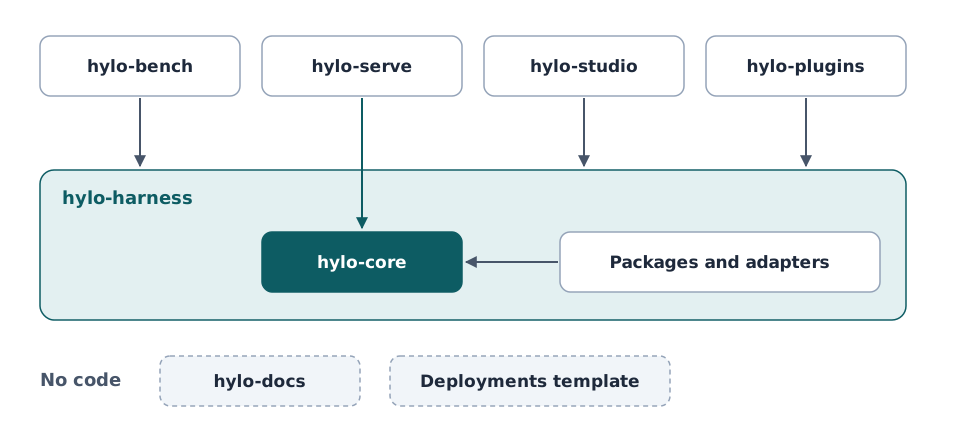
The development workspace
Check the repositories out side by side in one directory, under their short names, and bootstrap:
mkdir hylo && cd hylo
git clone https://github.com/HyloAI/hylo-harness.git harness
HYLO_GIT_BASE=https://github.com/HyloAI harness/dev/bootstrap.sh   # clones bench, serve, studio, plugins, docs
bootstrap.sh clones missing repositories when HYLO_GIT_BASE is set ($HYLO_GIT_BASE/hylo-<name>.git),
writes pyproject.toml in the directory (harness/dev/workspace.py: every package of every present repository is
a workspace member) and runs uv sync, which installs every package editable into one venv. The workspace
directory is not a repository: its pyproject.toml, uv.lock and .venv are generated. A subset works: the
harness alone, or the harness with one leaf.
After adding or removing a package, rerun python harness/dev/workspace.py . and uv sync; the boundary lint
fails while the workspace file is stale.
Tests
uv run pytest                                   # every present repository, plus the boundary lint
uv run pytest harness                           # one repository
uv run pytest harness/packages/hylo-core          # one package
uv run pytest harness/dev                       # the boundary lint only
Every package keeps its own tests next to it (<package>/tests/). Some tests need more than the venv and skip
themselves with the reason when it is missing:
| Test | Needs |
|---|---|
LIBERO end to end (bench/adapters/hylo-env-libero) |
the libero-sim runtime (bench/envs/libero/setup.sh) and user-space OSMesa |
MuJoCo rendering (hylo-env-mujoco, table vision) |
MUJOCO_GL=osmesa or egl |
LLM reasoners (hylo-reasoner-llm) |
HYLO_TEST_LLM=1 and a local Ollama server |
scaffold templates (hylo-cli) |
hylo-bench's MuJoCo environments |
real workcell in the control-plane test (hylo-playground) |
hylo-serve |
Test doubles
Unit and conformance tests that need an environment use the test double shipped with core
(hylo.testing: testing.point_reach and other testing.* plugins). It is a test double, not an
evaluation environment: examples, protocols, campaigns and published numbers use real simulators (MuJoCo,
LIBERO). hylo plugins hides testing.* unless --all.
Repository and package rules
harness/dev/repos.toml lists the repositories and what each may depend on; harness/dev/test_boundaries.py
enforces it:
- Package layering. Every
Hylo.*import (and everymodule:attror-m modulestring) in a package'ssrc/must target a package allowed for it in the lint'sALLOWEDmap (package layering). Heavy dependencies (torch, jax, mujoco, ...) are allowed only in the packages that wrap them. - Repositories. A package may import or declare only packages of its own repository and of the repositories it depends on. The leaves depend on the harness only and never import each other; the harness imports no leaf. Leaves cooperate through formats defined in hylo-core (formats).
- Robot side. serve's packages declare no Hylo dependency but
hylo-core, so a robot computer installs nothing else. - No reaching across by path. No code or config file uses a
../<repo>/path. Exempt: deployment configs and install scripts, which find a sibling checkout through an environment variable with a side-by-side default (HYLO_HARNESS). - The workspace file is current.
Adding a package
- Create it under
packages/(a core part of the repository) oradapters/(a wrapper around a third-party stack) of the right repository, with its ownpyproject.toml(hatchling,src/layout, alicense),src/andtests/. - Register its plugins under the
Hylo.<group>entry-point groups, and declare their contract versions and maturity underhylo.meta(plugin system, catalogue). - Add its module prefix to
OWNERand its allowed dependencies toALLOWEDinharness/dev/test_boundaries.py. - Regenerate the workspace (
python harness/dev/workspace.py .,uv sync) and run the tests.
A plugin outside the Hylo repositories is a package of its own: uv run hylo plugin new <group> <name>
scaffolds one that passes its conformance check as generated (extending).
Conformance kits
Every contract has a check that a plugin's own tests call, and the CLI runs on any registered plugin:
| Contract | Check | From the CLI |
|---|---|---|
| environment | hylo.testing.conformance.check_environment |
hylo conformance CONFIG |
| agent | check_agent |
hylo conformance CONFIG --agent, hylo plugin check agent NAME |
| policy | check_policy |
hylo plugin check policy NAME |
| guard | check_guard |
hylo plugin check guard NAME |
| memory store | check_memory_store |
|
| scorer | check_scorer |
|
| gate test | hylo.eval.conformance.check_gate_test |
hylo plugin check gate_test NAME |
| learner, online learner | hylo.learn.conformance.check_learner |
hylo plugin check learner NAME |
| data source | check_datasource |
hylo plugin check datasource NAME |
| success judge | check_judge |
hylo plugin check judge NAME |
| generator | hylo.evolve.conformance.check_generator |
hylo plugin check generator NAME |
hylo plugin check builds the plugin (--params JSON) and runs environment-dependent checks on --experiment, else
MuJoCo planar reach when installed, else the test double. It also warns when the plugin's declaration (contract
version, maturity, licence) is missing.
Commits
- One repository per commit, one logical change per commit. Commit in the repository you changed.
- A summary line that says what changed in plain words; a body that says why, and what was checked (which tests, which real runs).
- Tests and the boundary lint pass before a commit.
- Changes to a contract, a format or what an experiment measures come with an RFC or an RFC update in this repository (RFCs), and with a version bump of the format when it is not backward compatible.
- Third-party code is never copied into the packages without its source, commit and licence recorded (research rules).
Documentation
Reference docs for a repository's own packages live in that repository's docs/ (the harness's are rendered here
under Developer Guide); everything that spans repositories lives here. See docs.