Installation
Hylo is several git repositories, developed side by side and installed into one Python environment. The harness is the base; bench, serve, studio and plugins are leaves on top of it (see repository structure). You need:
- Linux (the LIBERO setup assumes Ubuntu 24.04 for its user-space OSMesa install);
- Python 3.10 or newer;
- uv;
- no GPU: everything here runs on CPU.
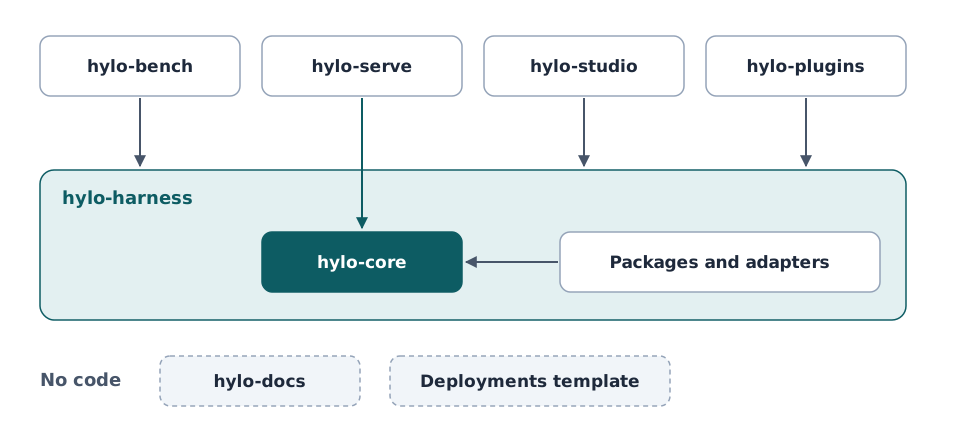
The harness is the only base. Leaves never import each other; they cooperate through formats defined in hylo-core.
The development workspace
Check the repositories out next to each other in one directory, then run the harness's bootstrap script there:
mkdir hylo && cd hylo
git clone https://github.com/HyloAI/hylo-harness.git harness
HYLO_GIT_BASE=https://github.com/HyloAI harness/dev/bootstrap.sh
# clones bench, serve, studio, plugins and docs next to it, writes ./pyproject.toml (a uv workspace), runs `uv sync`
bootstrap.sh [DIR] does three things:
- For each repository listed in
harness/dev/repos.tomlthat is missing inDIR, it clones$HYLO_GIT_BASE/hylo-<name>.gitwhenHYLO_GIT_BASEis set, and skips the repository otherwise. - It writes
DIR/pyproject.tomlwithharness/dev/workspace.py. That file makes every package of every present code repository (<repo>/packages/*,<repo>/adapters/*) a workspace member. - It runs
uv sync, which installs all of them editable intoDIR/.venv.
The workspace directory is not a repository: its pyproject.toml, uv.lock and .venv are generated. Rerun
python harness/dev/workspace.py . after adding or removing a repository; the boundary lint fails while the file is
stale.
The workspace has optional dependency groups:
| Group | Installs | For |
|---|---|---|
dev (default) |
pytest, httpx | the tests |
demo |
imageio, matplotlib, pillow | videos and figures from examples |
docs |
mkdocs-material, mkdocstrings, mkdocs-gen-files, mkdocs-glightbox | building this site |
A subset of the repositories
The workspace covers whatever repositories are present, so you can work on the harness alone, or on the harness and one leaf. Tests that need another repository skip themselves; for example, the plugin scaffold test needs bench's MuJoCo environments.
| Checkout | What you can run |
|---|---|
harness |
contracts, kernel, learners, campaigns and conformance on the test double (testing.* plugins) |
harness + bench |
MuJoCo and LIBERO experiments, protocols, scorecards, leaderboards, the examples |
harness + serve |
policy servers and workcells (a robot computer installs only hylo-core and serve) |
harness + studio |
the playground and the control plane (rebuilding the web front end needs Node) |
harness + plugins |
the example plugins, written the way a third party would |
MuJoCo
MuJoCo comes with hylo-env-mujoco (in bench) and needs nothing else for experiments. Camera rendering (the
table-reach vision variant, figures) needs an OpenGL backend. On a GPU machine set MUJOCO_GL=egl; otherwise install
user-space OSMesa (next section) and set MUJOCO_GL=osmesa.
LIBERO and LeRobot policies
LIBERO's dependencies (robosuite, its pinned MuJoCo, LeRobot with SmolVLA) conflict with the workspace. They live in a separate venv inside bench, and experiments reach them as out-of-process runtimes.
The script downloads Ubuntu 24.04's libosmesa6 (and libllvm20 if it is missing) with apt-get download
and unpacks the packages into ~/.local/mesa; no root needed. Rendering then uses MUJOCO_GL=osmesa,
PYOPENGL_PLATFORM=osmesa and LD_LIBRARY_PATH=~/.local/mesa/root/usr/lib/x86_64-linux-gnu.
The script:
- builds
bench/envs/libero/.venv(Python 3.12, CPU) and installs LIBERO andlerobot[smolvla]; - installs the harness packages it needs, editable, from the harness checkout next to bench (
HYLO_HARNESS, default../harness); - downloads the LIBERO assets (
lerobot/libero-assets, research use only) and writes a non-interactive LIBERO config.
At the end, setup.sh registers two runtimes in this machine's
execution profile:
| Runtime | What runs there | Environment |
|---|---|---|
libero-sim |
the LIBERO simulator (env.remote: {runtime: libero-sim}) |
OSMesa variables, LIBERO_CONFIG_PATH, thread limits |
lerobot |
LeRobot policies (agent: {type: remote, params: {runtime: lerobot}}) |
HF_HOME=bench/envs/hf-home, HF_HUB_OFFLINE=1 |
Experiment configs name these runtimes, never paths. So LIBERO experiments run from any directory, and where the venv lives never changes an experiment's digest (RFC-0005).
Model weights
The lerobot runtime sets HF_HUB_OFFLINE=1: policies load weights only from bench/envs/hf-home, and
setup.sh does not download any. Put a checkpoint into that cache once (for example lerobot/smolvla_libero,
with HF_HOME=bench/envs/hf-home huggingface-cli download ...) before running LIBERO configs. Weight licences
differ from the code's; see the plugin catalogue.
The run and artifact store
Runs and learned artifacts are found by id through this machine's store (see store). Register the directory your runs go to once:
uv run hylo store init bench/runs      # recorded as `store:` in ~/.config/hylo/profile.yaml
uv run hylo store ls
Without a registered store, $HYLO_STORE is used if it is set, and ./runs relative to the working directory
otherwise.
Check the installation
uv run hylo --help              # subcommands contributed by the installed packages
uv run hylo plugins             # every plugin: contract version, maturity, licence
uv run pytest                 # every present repository, plus the boundary lint (harness/dev)
hylo --help lists only the commands of installed packages: hylo bench comes from bench, hylo serve from serve and
hylo playground from studio. Next: the quickstart.